How I turned a 10,000 yen photo frame into a custom dashboard for my home
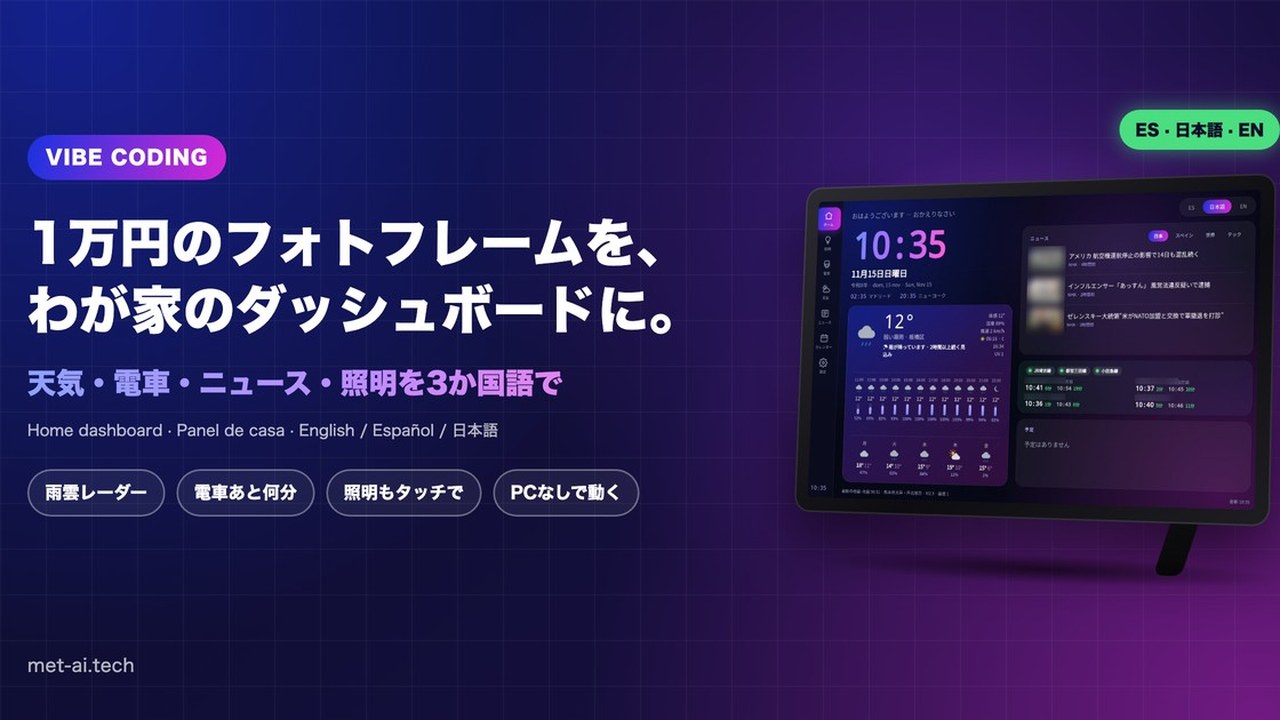
I transformed a digital photo frame costing about 10,000 yen from Amazon into a "custom dashboard for my home" by interacting with AI. It displays weather, rain radar, trains, news, earthquake information, and lighting in Japanese, Spanish, and English, and operates as a standalone unit without the need for a computer.
I am Debitto Lozano, representative of MetAI LLC.
In my living room, there is a photo frame that does not display photos. What it shows are the weather, train information, and the news.
I bought a 10.1-inch digital photo frame (Frameo compatible, 1920×1200) on Amazon for about 10,000 yen. I have repurposed this into a "dedicated dashboard for my home."
I built it using "vibe coding," a method of creating things while having conversations with AI.
It all started with an article by Wes Bos
It all began with an article titled "Hacking smart photo frames" by overseas developer Wes Bos.
Even cheap photo frames are essentially small Android tablets inside. I thought that if that were the case, I should be able to display screens tailored to my home.
I didn't disassemble or modify the hardware. By turning on the "Beta Program" in the Frameo settings, a developer switch called "ADB access" appears. This is an official feature from the manufacturer.
From there, I connected it to my computer via a cable and installed a small display app. Based on an app released by Wes Bos, I set it to display a dashboard full-screen. I also configured it so that it launches immediately upon powering on.
What it can do
The display is available in three languages: Japanese, Spanish, and English. You can switch between them at any time in the top right corner, and the date includes the Reiwa (令和) era year.
Weather information includes current conditions, 12-hour intervals, and weekly forecasts. It provides one-line notifications for rain within the next two hours, such as "Rain expected around 15:20."
The rain cloud radar uses the Japan Meteorological Agency's Precipitation Nowcast. It displays an animation on a map centered on your home, covering the period from 45 minutes ago to one hour into the future.
For trains, it shows the operating status (normal service, delay, or suspended) for three frequently used lines. For the two nearest stations, it displays how many minutes remain until the next train. The timetable automatically switches between weekdays, Saturdays, and holidays.
News headlines from NHK, El País, BBC, and Hacker News are displayed with photos. Tapping a headline allows you to read the article within the frame.
Warnings and advisories for major earthquakes or your specific ward are displayed as a banner at the top of the screen.
You can also control your lighting (Philips Hue). Options include on/off for each room, brightness, scenes, and "Turn all lights off."
The display also changes depending on the time of day. On weekday mornings from 7:00 to 9:00, the train and rain information are displayed prominently. At night, the screen dims and will brighten for only five minutes upon being touched.
How it works without a computer
Initially, I ran a small server on my Mac at home, and the frame simply acted as a display for it.
However, with this setup, the display would stop every time the Mac went into sleep mode. The same thing happened whenever the IP address changed.
To solve this, I integrated the entire data collection mechanism directly into the frame. Now, all it needs is a power connection and Wi-Fi.
The weather updates every 10 minutes, trains every minute, and news every 15 minutes. The frame updates itself.
To add news or change stations, I simply rewrite a configuration file online. The changes are reflected on the frame within a few minutes.
All data is pulled from publicly available sources. Weather comes from Open-Meteo; rain cloud radar and warnings from the Japan Meteorological Agency; and earthquake information from P2P Earthquake Information. Toei Line timetables are sourced from Public Transportation Open Data, and news comes from various companies' RSS feeds. Train timetables are limited to personal use.
Since the browser inside the frame is several years old, I built it by selecting only the features it is capable of using.
What didn't go well
It wasn't all smooth sailing.
The computer wouldn't recognize it. The included cable is for charging only, and it won't connect even with a USB-C to USB-C cable. I finally got it to be recognized using a USB-A to USB-C data cable and an adapter.
One morning, it started stuck in a reboot loop. This was caused by the frame automatically updating its firmware. It had been reading files left over from a previous app installation attempt, which caused it to stall. The AI read the error logs remaining on the frame, deleted only the problematic files, and restored it. I have since disabled automatic updates.
I cannot speak to it. This frame does not have a microphone. To ask questions via voice, you need another device, such as a Bluetooth microphone.
The Japan Meteorological Agency's data format had changed. With the "New Disaster Prevention Meteorological Information" (arata na bousai kishou jouhou) in May 2026, the location of the warning data had changed.
Things I decided for myself instead of leaving them to AI
Even with vibe coding, there were decisions I did not hand over to the AI.
• Granting USB debugging permission
• Pressing the button on the lighting bridge
• How to handle accounts and what to put online
These are parts related to the entry points to my home devices and the information sent out to the world. I operated these with my own hands and made these decisions myself.
Rather than adjusting myself to the way off-the-shelf products work, I am rebuilding tools to fit my lifestyle. This was a small experiment in that direction.
At MetAI, we help implement internal tools, web tools tailored to your business, and AI that runs in local environments using this approach. If you are wondering, "How would this work for us?", please feel free to contact us.
Details of the screen are summarized in the original article. https://www.met-ai.tech/ja/blog/26-11-15---frameo-family-dashboard/
References
• MetAI Official Blog: "Turning a 10,000 yen digital photo frame into a dedicated dashboard for my home" (November 15, 2026)
https://www.met-ai.tech/ja/blog/26-11-15---frameo-family-dashboard/
• Wes Bos: "Hacking smart photo frames" (Link is within the original article above)
• Data provided by: Open‑Meteo, Japan Meteorological Agency, P2P Earthquake Information, Public Transportation Open Data Center, Yahoo! Transit, Geospatial Information Authority of Japan (GSI Tiles), NHK, El País, BBC, Hacker News
🧪 Trial section. Article originally published in Japanese on note.com and translated into English and Spanish for everyone.
Read the Japanese original on note (MetAI) ↗More in Other
- An Era Where Cars Can Be "Analyzed" by AI: Where Do We Draw the Line to Protect Lives?
- Exhibited at NIIGATA AI EXPO 2026: AI Virtual Humans running on a single PC received a huge response
- Speaking at the Itabashi Industrial Fair on November 5 and AI BEYOND 2026 on November 6
- The era of choosing sref after seeing it: Free directory "Sref Explorer" released
- 5 Things to Decide Before Giving Meta's "Muse" the Keys to Your Work